Delphic Oracle Astrology Software

Version:  6.2.1.4
Last Updated:  May 16, 2012
File Size:  17.1 MB
Requirements:  Win 7/Vista/Xp (64 bit or 32 bit), 256 MB RAM, 50+ MB HD
Ordering:  [ Online Mall ] [ Buy with check or money order Mail Orders ]
 

Order Online

Accept Credit Cards

Delphic Oracle 6 license includes Timaeus 8 Pro!.

 License: $299.00  
 DVD Video Manual: $10.00  
 Add CD: $6.50  


Technical support powered by GoToAssist.

Main Highlights


Includes the new Terran Atlas database of 13 million records of places, latitudes, longitudes and time zone lookups based upon the Olson time zone database standard for 250 countries. It also comes with about 700 location type definitions similar to Google Maps to differentiate between different location types (such as post offices, hotels, restaurants, parks, mountains, lakes, streams, etc...) There are 3 search modes (Filter, Locate and Browse) to cover different search scenarios.
Includes a new medieval module with various calculations important during the classical and middle ages such as primary directions with various options for latitude, zodiacal and mundane directions both direct and converse. Also added tabulated essential dignities of the planets and houses with almuten calulation, and Bonatti's degree attributions (masculine and feminine, degrees of azemena, welled/pitted, bright, dark, smoky, empty, degrees of increasing fortune, etc). Bonatti used these for horary astrology. There is tabulated calculation of the almuten figurae (chart ruler) according to Ibn Ezra which allows you to know how lopsided the almuten is or whether it is a borderline case. In the case of ties, the planets are shown that are candidates. More soon...
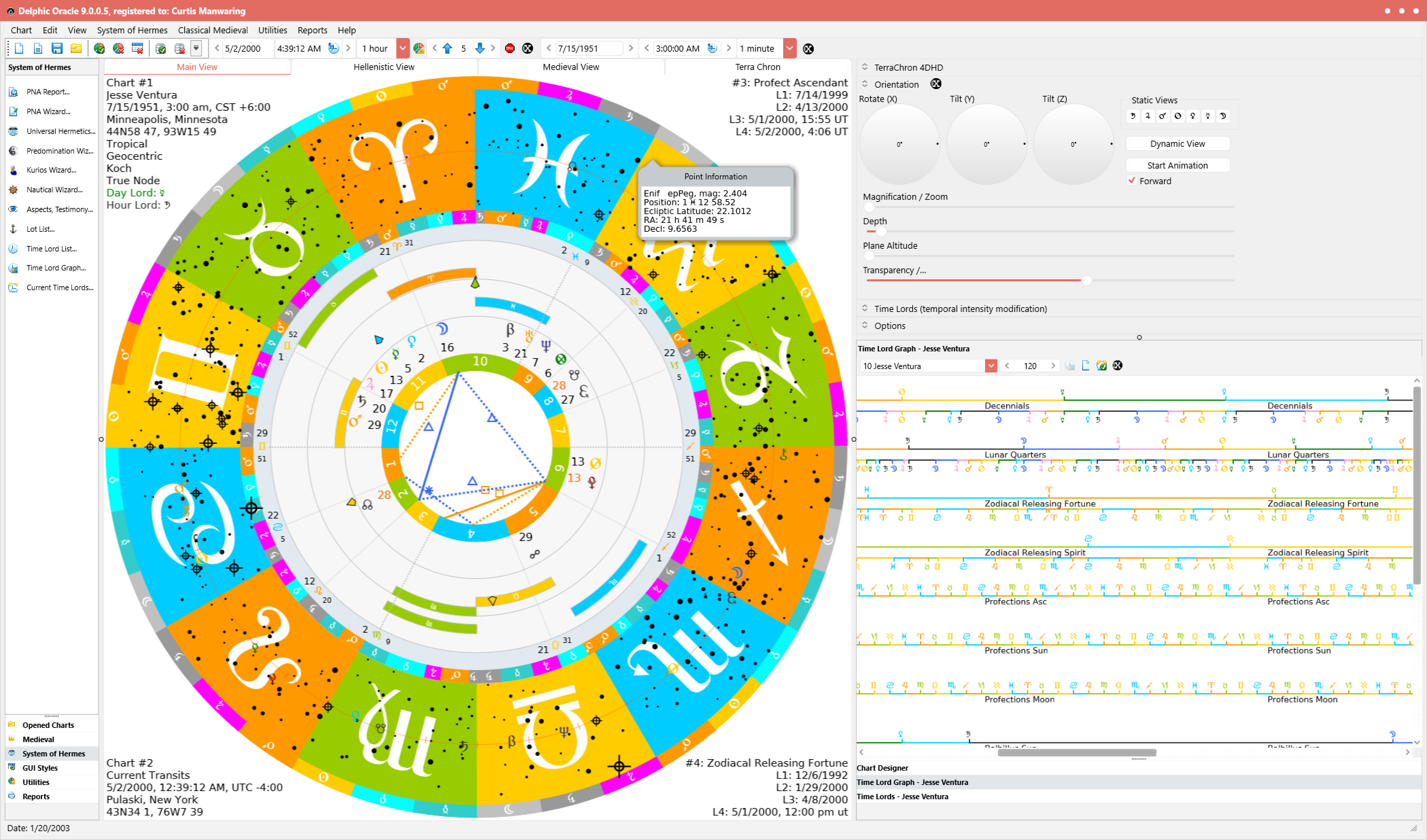
The Modern Wheel Styles beautifully displayed are fully customizable allowing you to show bounds, ticks, and even aspect and testimony lines according to the Antiochus Aspect Doctrine, platic aspect lines, etc, surpassing the display capabilities of such programs as Solar Fire and Kepler/Sirius. Colors can be chosen for any object displayed in the wheel and saved as a Color Theme. User defined glyphs allow you to switch to your favorite glyph for any given celestial object. There are now 43 different planets / asteroids / points which can be shown in the chart wheel!
The Time Lord Graph makes comparing time lord sequences a snap! You can create user defined time lord displays spacing graph lines and define which time lord methods fall in which row for easy comparison. These settings can be saved as a group known as a time lord theme. There are over 80 time line options for 18 time lord methods for over 20 points in the natal chart. Also, clicking on the graph will show transits, progressions, etc as defined in your settings for the Autogenerated Charts in the main program options. There is no need to set up transit, progression charts to contrast to natal manually. It simply uses the default location you specify and the exact time of the onset of the period that you clicked on! This saves a lot of time as you can literally be viewing progressions and transits to natal a split second after displaying a natal chart!
The Graphic Ephemeris has the capability to draw in time spans of as little as 1 month up to 10 years. What makes this graph special is that it shows the heliacal phenomena (both heliacal rising and setting and acronycal) as dots on the screen. These dots will show a hint with statistics when your mouse cursor is on top of it and in the statusbar. The zodiacal division (dial options) include 360, 180, 90, and 45 degrees.

The Graph is also clickable and will show the Autogenerated charts (transits, progressions, etc) you specify so that you can compare the charts for the time you clicked on to the natal in a flash! Once the chart(s) are showing, you can animate them backwards or forwards in time.
Wizards and tables for the PNA (Preliminary Natal Analysis), Universal Hermetics, Nautical Metaphor, Predomination and Kurios (chart rulers) help you see the chart from a Hellenistic perspective with 36 steps and several other choice selections. The PNA and Universal Hermetics tables arrange the data according to Schmidt's reconstruction of the System of Hermes based upon texts from Valens and Antiochus which is the only program in the world that does this!
The new autogenerated chart setup allows you to see transits and progressions on the fly with a single click! Simply indicate the order and number by drag and drop from the list of available charts and selected charts. The order in the list indicates the order of drawing (outerwheel to inner wheels). This saves a lot of time compared to other programs which make you set up transits and progressions manually. Simply click on one of the interactive windows such as the Graphic Ephemeris, Time Lord Graph, etc to get these positions for the dates that you are interested in!
The new Chart Designer with GUI Styles is the most sophisticated in the world allowing you to control the visibility, colors, and dimensions of wheels and glyphs on your screen with the ability to automatically scale your fonts and every control in your display! Wheel dimensions for uniwheels, biwheels, triwheels and quadwheels, glyph colors, glyph characters and glyph visibility all have grouped settings known as Themes that allow you to bring back your themes with a single click!

Wheel Categories allow you to quickly redesign your own wheel types and see the results immediately by redrawing the chart type you are working on. There's no need for clumsy wheel definitions, simply save a wheel theme on the Themes tab when you have made your settings.
New data entry and chart database capabilities. You can create your own databases and group them together such as horary database with the name horary.zcf for all of your question charts, celebrities.zcf for famous people, personal.zcf for charts that are private and so on (this is also a good way to keep personal charts private).

The chart database is searchable and you can do case sensitive searches or limit your searches to a given database or search all databases at once. The data entries can be sorted according to alphabetical order, dates and chart types depending upon the column header you click on. The new data entry window allows you to enter notes about the chart, show accuracy of the birth info, etc.

  Terran Atlas View


  Modern Multi-Wheel View

  Time Lord Graph View


  Graphic Ephemeris View

  Autogenerated Chart View

  Chart Designer View

  Time Lord List View

Program Details

Delphic Oracle screen shotDelphic Oracle is advanced research software with the ability to cross reference transit and progression charts of many types to various time lord systems through the use of interactive graphs often with a single click! This program includes various techniques from such ancient authors as Vettius Valens, Antiochus of Athens, Rhetorius, Paulus Alexandrinus, Claudius Ptolemy, Guido Bonatti, Ibn Ezra, Montulmo and many others that spans from the Hellenistic era through Medieval up to the Modern era. Delphic Oracle has a very modern interface with a large array of features such as hi-resolution printing, Adobe Acrobat file generation, an html web publishing tool, a transit / progression animator, an interactive graphic ephemeris showing heliacal rising and setting and time lord graph, reports on countless techniques, a full set of delineations and uses the Swiss Ephemeris and the new Terran Atlas. It is the only program that includes Robert Schmidt's research in the "System of Hermes" and the only program endorsed by Project Hindsight. Recent additions to the program include aspect and testimony lines based upon the Antiochus aspect doctrine, primary directions, calculation of the almuten figurae and house / planet almutens, a chart database that is searchable, a chart designer that allows up to 4 wheels to be configured for transits, progressions, directions, etc...

Version 6 has a highly polished GUI with new icons for all the features. I have streamlined the main window a bit moving the open chart list back toward the top left and removing the unnecessary chart details memo (the same comes up as a popup hint when you click a chart entry). This allows the area to the right full docking expansion to the top. The Chart Designer now uses value list editors to edit different wheel types that have the capability to show up to 4 charts at the same time (quad-wheel). These are fully customizable and there are settings for wheel types, colors, user defined glyphs and visibility. Since there are many settings for each of these areas, each setting group has the capability to be saved as a theme on the themes tab. Wheel themes, color themes, visibility themes and glyph themes have already been defined for the average user, and trying each of these out only requires a double click on the theme and a re-draw of the chart.

Version 6 still makes use of docking to streamline the interface, but there is the option of whether to dock windows or let them float freely. There is only 1 space on the taskbar taken up by an instance of Delphic Oracle and multiple instances can be run side by side. Splitters handle the layout and retain their spacing through different sessions. There is a group bar on the left with all program functions that slides in and out by clicking on the splitter control. The chart database has been set up to save multiple charts in user defined files. These files can be searched individually or globally for saved charts and you can define chart groups such as "horary" or "electional", etc. Also the database can be sorted by date, name, etc. The chart inputs for accuracy rating on the time and a note field have been added to each chart that you save. There is no setup window that is separate from the chart viewer (which causes waste of time as is the case with Solar Fire). The viewer is in the center of the main window and is tabbed to display different views of the same chart.

Newly Added!

Preliminary Natal Analysis (PNA)

Universal Hermetics

Topical Approach

Time Lord Methods (the western equivalent of the Hindu dasas)

The Basics


Zoidiasoft Technologies Astrology Software